
Mobile app
The Portal on iPhone, Android and the web, with the account you already have.
13 features in 4 groups. Not in the stores yet. It works with your Portal account, with no separate subscription.
Away from the desk, a simple question about an invoice or a payslip waits until someone is back at a computer.
With Mobile app
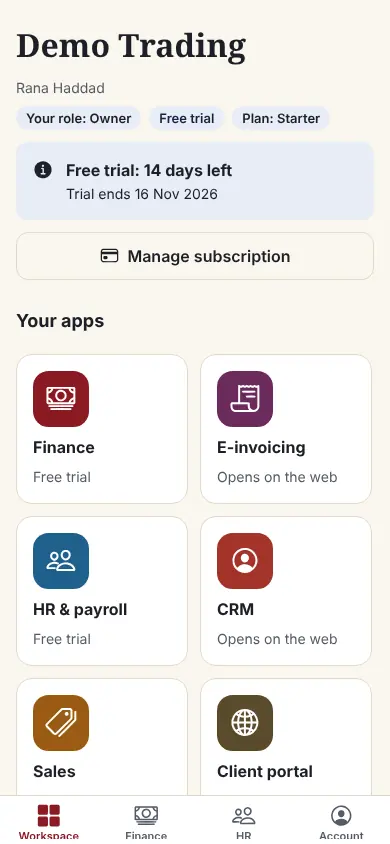
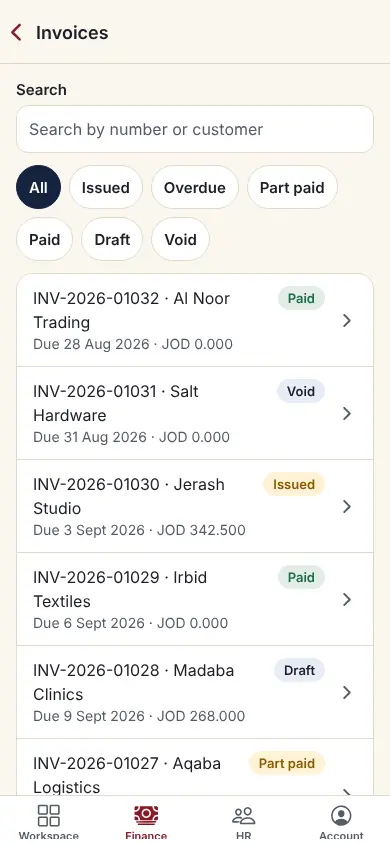
Use the Consult One app in your browser today at portal.consult-one.com/app; the iPhone and Android builds are on their way to the App Store and Google Play. It signs in with your Portal account and two-step sign-in, opens your workspace, shows Finance read only and gives every employee their own HR self-service.
Group 1 of 4, 5 features
Your account
- In the browser today: open /app on the Portal, nothing to install
- Sign in with email and password, Apple or Google
- Two-step sign-in code, the same as on the web
- Create an account and your organisation from the app
- Linked sign-in methods, recovery codes and account deletion
Group 2 of 4, 3 features
Workspace
- Switch between the companies you belong to
- See your apps; owners and administrators can start a trial of another app
- Open any Portal page in the browser through a single-use link
Group 3 of 4, 3 features
Finance and HR
- Finance summary, invoices and invoice details, read only
- Payslips, leave balance and leave requests
- Your timesheet
Group 4 of 4, 2 features
Notifications
- Push notifications with your own preferences
- Ask Consult One about a service from the app
How it works
- 1
Open it
In your browser at portal.consult-one.com/app today; from the App Store or Google Play once published.
- 2
Sign in
With your Portal account and your two-step code.
- 3
Open your workspace
Your company, your apps, your payslips.
Works with
Apps it connects with inside the Portal. Each has its own presentation.
Settings and security
Settings you control
- Notification preferences
- Linked sign-in methods
Your data stays your company's
- Every company has its own separate books that no other company can see.
- Two-step sign-in is required for owners and administrators.
- Access by role: owner, administrator, accountant, staff, read only.
Start free, pay later
In early access: we switch it on for your company on request.
Starter
- Finance & Accounting
- E-invoicing
- Sales: quotes & orders
- CRM & Contacts
- HR & Payroll
- Customer portal
- Reports & Dashboards
- Up to 2 users
Business
- Everything in Starter, plus:
- Inventory, POS & Store
- Projects & timesheets
- Helpdesk & Help Centre
- Appointments
- Document signing
- Up to 5 users
Prices in Jordanian dinars per month.
Questions before you start
Can I use it today?
Yes, in your browser: open portal.consult-one.com/app and sign in with your Portal account. The iPhone and Android builds are being prepared for the App Store and Google Play; this page will link to the stores when they are published.
Do I need a separate account?
No. It uses the same account, company and two-step sign-in as the Portal on the web.
Open your workspace today
14-day free trial, no card needed. Two-step sign-in is on from day one.